

Security
Your data and your team’s, protected and in plain sight
IndeXpense security is visible in your own account: which sessions are open, who signed in and why.


Your data and your team’s, protected and in plain sight
Two-step verification
A code from your authenticator app in addition to your password.
Visible, revocable sessions
See where your account is signed in and end any session you don’t recognize. Changing your password signs out all the others.
Tamper-evident audit log
Every important change is logged with an integrity check, so any alteration can be detected.
Private attachments
Receipts are kept in private storage, with no public links, and open only when you’re signed in.
Support only with your permission
INDESAD doesn’t see your data. To help you, it gets in with a reason and an expiration, visible to your company and with an email notice.
Link-based invitations
Each person creates their password from a link that expires. Nobody sends passwords by email.
Support access
INDESAD gets in only when needed, and you see it
- What it does
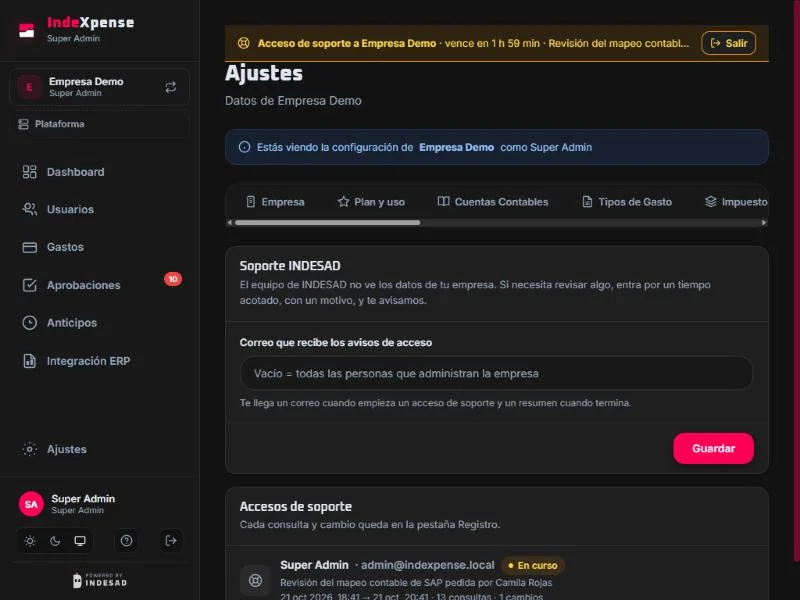
- The INDESAD team doesn’t see your company’s data. If it needs to check something, it opens a limited support access session.
- How it works
- Every access requires a reason and expires automatically (between 1 and 24 hours).
- While it lasts, a banner shows it on screen; your company gets an email when it starts and a summary when it ends.
- Every query and every change is recorded in your company’s Log. Passwords and keys stay hidden.
- In Settings › INDESAD Support you choose which email receives the notices and see every access, ongoing and past.
- Who it’s for
- For companies that need to know exactly who saw their data and when.
My account
Your account security, in your hands
- What it does
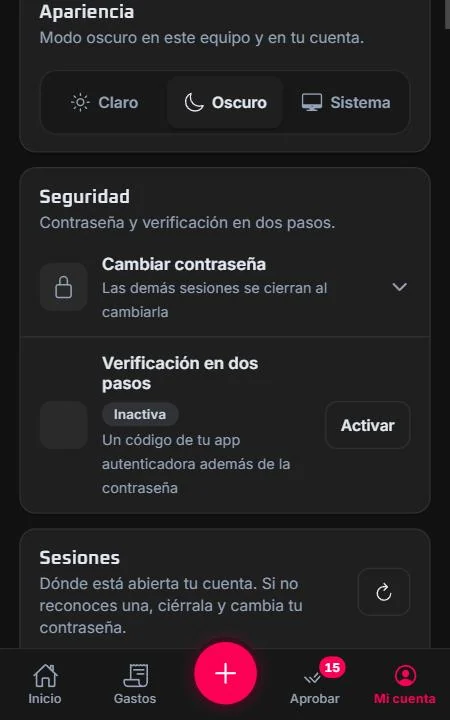
- From My account you turn on two-step verification, change your password and review your sessions.
- How it works
- Two-step verification with any authenticator app.
- Session list with device and last use; end one or all the others.
- Versioned acceptance of terms: if they change, you’re asked to accept the new version.
- Who it’s for
- For everyone who uses IndeXpense, from the portal or the app.
FAQ
What people ask us most
Does it work with SAP Business One?
Yes. IndeXpense connects to your database through Service Layer and sends each approved expense as an accounting document, with the expense type’s account and taxes. Each expense shows whether it reached SAP and under which number.
What happens if SAP doesn’t respond?
The expense is queued and retried automatically when it’s safe. Each expense is sent with a unique key, so it’s never created twice. If it’s unclear whether the document was created, it’s flagged for review and finance gets a notification.
Do I need to install anything?
No. The portal runs in the browser and the app installs from your phone’s browser (it’s also available for Android and iPhone). For SAP, your Service Layer must be published over HTTPS; we’ll help you check it.
Can I submit expenses over WhatsApp?
Yes, on the plans that include it. Send the photo to the IndeXpense number from the phone registered in your profile; the bot reads the receipt, asks for anything missing and gets the expense ready to send for approval.
Who approves expenses?
By default, the submitter’s direct manager. If you need to, you can define workflows by amount, expense type or cost center. Approvers can approve, return for changes or reject with a reason, and they get reminders if something has been waiting for days.
Is my data secure?
Receipts are kept in private storage and open only when you’re signed in. You get two-step verification, visible sessions and an audit log with integrity checks. Each company sees only its own data.
Can INDESAD see my data?
Not by default. If we need to check something to help you, we open a support access session with a reason and an expiration: your company gets an email notice, sees it on screen, and every query is recorded in its Log. Access expires automatically.
Can I try it for free?
Yes. Create your account and start on the free plan for companies or for individuals. When you need more users, advances or SAP, change your plan from Settings.
Your next expense report, paperless
Create your free account or let’s talk about your company, how you approve and your SAP.

