



SAP Business One

Approved expenses reach SAP Business One, exactly once

IndeXpense connects to your SAP Business One database through Service Layer and sends each approved expense as an accounting document, with a log of every attempt.

How it works

  1. Connect your database

    Finance saves the Service Layer connection. The password is encrypted and never shown again.

  2. Test before you activate

    The connection is activated only after a successful test with those same credentials.

  3. Map your accounts

    Each expense type carries its GL account and taxes, just as your accounting team uses them.

  4. Approved expenses are sent

    Automatically every 30 minutes or whenever you choose. Only fully approved expenses are sent.

  5. See the result

    Each expense shows its SAP status (posted, queued or needs review) with the document number.

What if SAP doesn’t respond?

  • No duplicates

    Each expense is sent with a unique key. A retry never creates a second document.

  • Safe retries

    If SAP is unavailable, the expense waits in the queue and is retried automatically when it’s safe to do so.

  • Automatic circuit breaker

    If SAP keeps failing or rejects the password, IndeXpense stops retrying and alerts you, instead of locking your user.

  • Uncertain cases go to review

    If it’s unclear whether the document was created, the expense is flagged for review with its reference; nothing is guessed.

  • Finance gets notified

    When a submission fails, finance receives an email with the reason.

  • Everything is logged

    Every request, response and attempt is stored, without sensitive data, for auditing.

What gets created in SAP

  • A journal entry or vendor invoice, depending on how your accounting team works.
  • With the expense type’s account, taxes and cost center when applicable.
  • With a reference to the IndeXpense expense so you can find it from SAP.
Who it’s for
For companies that run their accounting on SAP Business One and key in expenses by hand or load them from spreadsheets today. Your Service Layer must be published over HTTPS; we’ll help you check it.
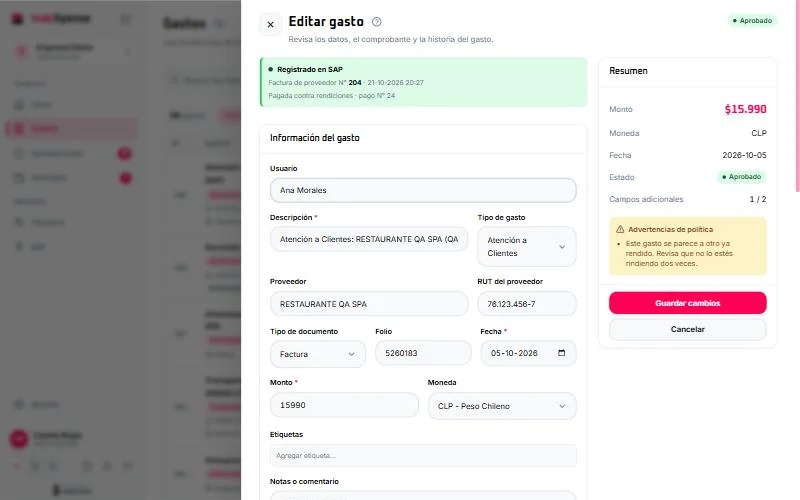
Portal: expense recorded in SAP with invoice and payment numbers, locked for editing

Your next expense report, paperless

Create your free account or let’s talk about your company, how you approve and your SAP.

[email protected]